Register and Verify Users
In COOLROOL, authentication ensures that each user—be they a club administrator, a coach, a parent, or an athlete—has secure and appropriate access to their data. This guide walks you through the core authentication flows:
- Register or Admin-Register: The user provides a
phoneandpassword(and possibly other details). An SMS code may be sent to confirm ownership of the phone. - Verification: The user inputs the code. If it matches, their account is marked `verified.
- Login: Once verified, you can call
POST /auth/loginorPOST /auth/admin-loginto receive a JWT token. This token is used in Authorization headers for all subsequent calls to protected endpoints.
By following these steps, clubs can safely onboard new users, and those users can confidently access protected endpoints (like managing events or club details).
Typical Workflow
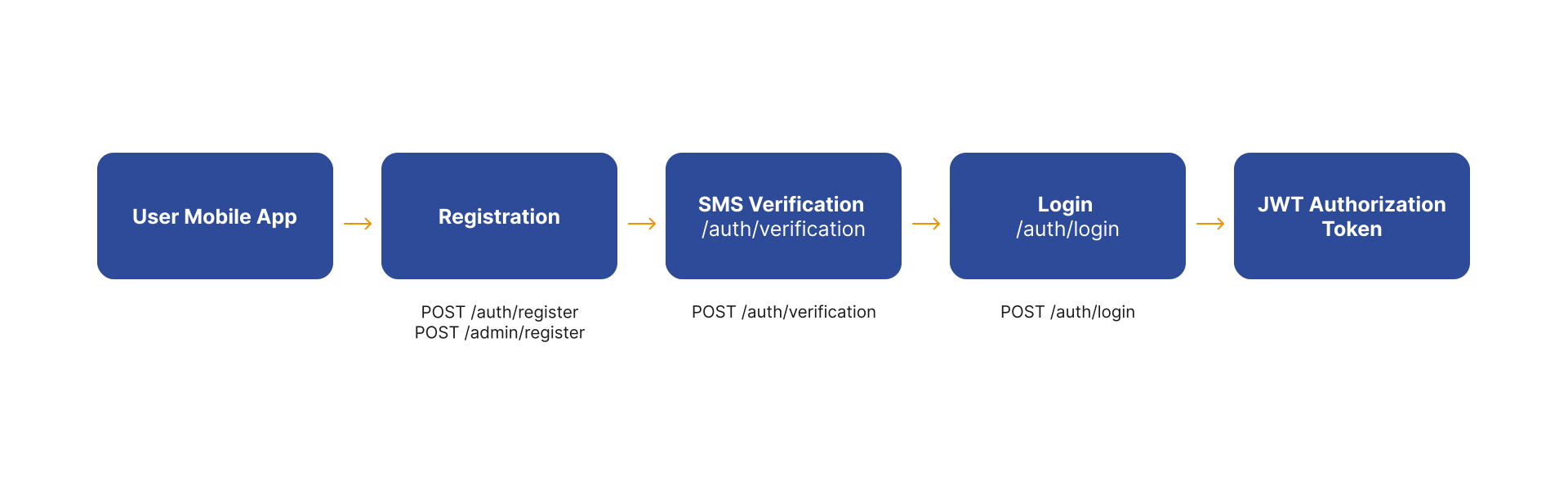
1. Register a New User
The registration process begins with creating a new user account using the POST /auth/register endpoint. This step collects essential user information and initiates the account creation process by providing the phone and password. The following example shows how to register a new user:
curl --request POST \
  --url https://api.coolrool.com/auth/register \
  --header 'Content-Type: application/json' \
  --data '{
    "phone": "+905521234567",
    "password": "Abc12345"
  }'
2. Verify Phone Number
The verification process involves sending a 4- or 6-digit SMS code to the user's phone number. This code is then verified using the POST /auth/verification endpoint. The following example shows how to verify a phone number:
curl --request POST \
  --url https://api.coolrool.com/auth/verification \
  --header 'Content-Type: application/json' \
  --data '{
    "phone": "+905521234567",
    "verificationCode": 1234
  }'
3. Login
Once the phone number is verified, you can login using the POST /auth/login endpoint. The following example shows how to login a user:
curl --request POST \
  --url https://api.coolrool.com/auth/login \
  --header 'Content-Type: application/json' \
  --data '{
    "phone": "+905521234567",
    "password": "Abc12345"
  }'
The returned token (JWT) must be included in the Authorization header for further requests:
Authorization: Bearer eyJhbGciOiJIU...
4. Admin Registration & Login
Admin workflows mirror user flows but use:
The request body is nearly the same, but the new account will have additional privileges. Keep any admin tokens secure and limit usage to appropriate features like club suspension or user management.